

Last checked:
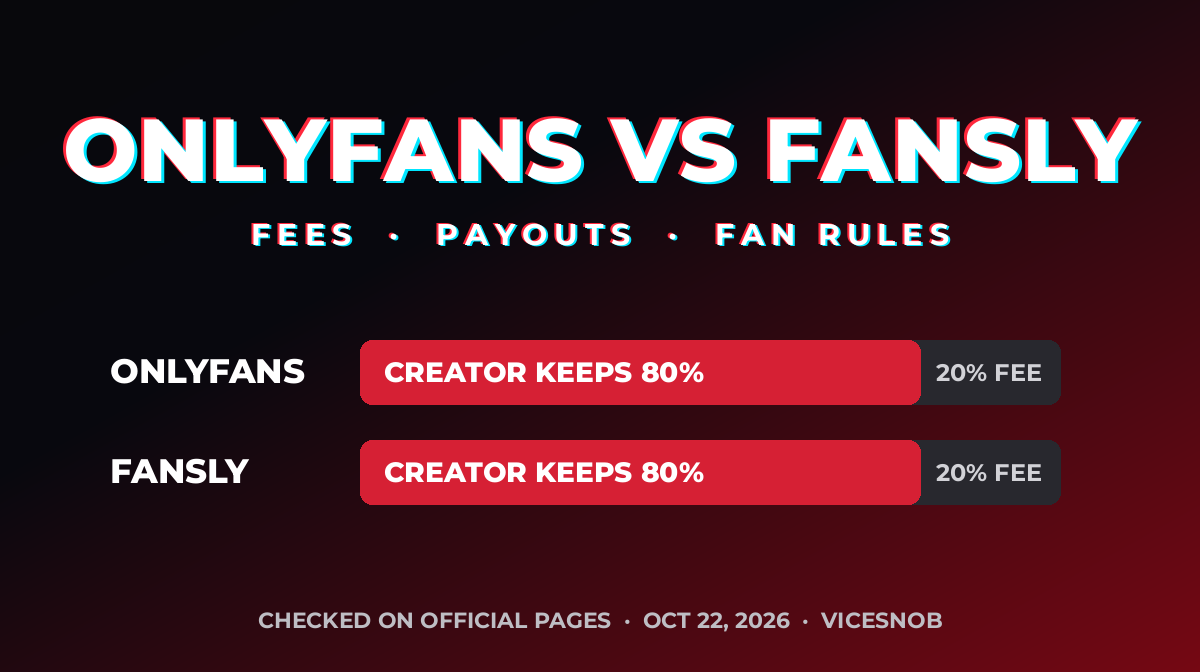
In the OnlyFans vs Fansly match-up, the money split is a tie. Both platforms keep 20% of every fan payment, so creators keep 80% on either one. The real differences are price limits, payout timing and the rules fans agree to.
A note on privacy
A VPN hides your IP address from the sites you visit. It doesn’t hide card payments from your bank, or your account from the platform. Don’t use one to get around age checks or country rules.
Affiliate linkWe may earn a commission at no extra cost to you.
We read both platforms’ official terms and help pages on October 22, 2026. We also counted which platform our own creator profiles list as their main page. This article has no affiliate links, and neither platform paid us to write it.
Key Takeaways
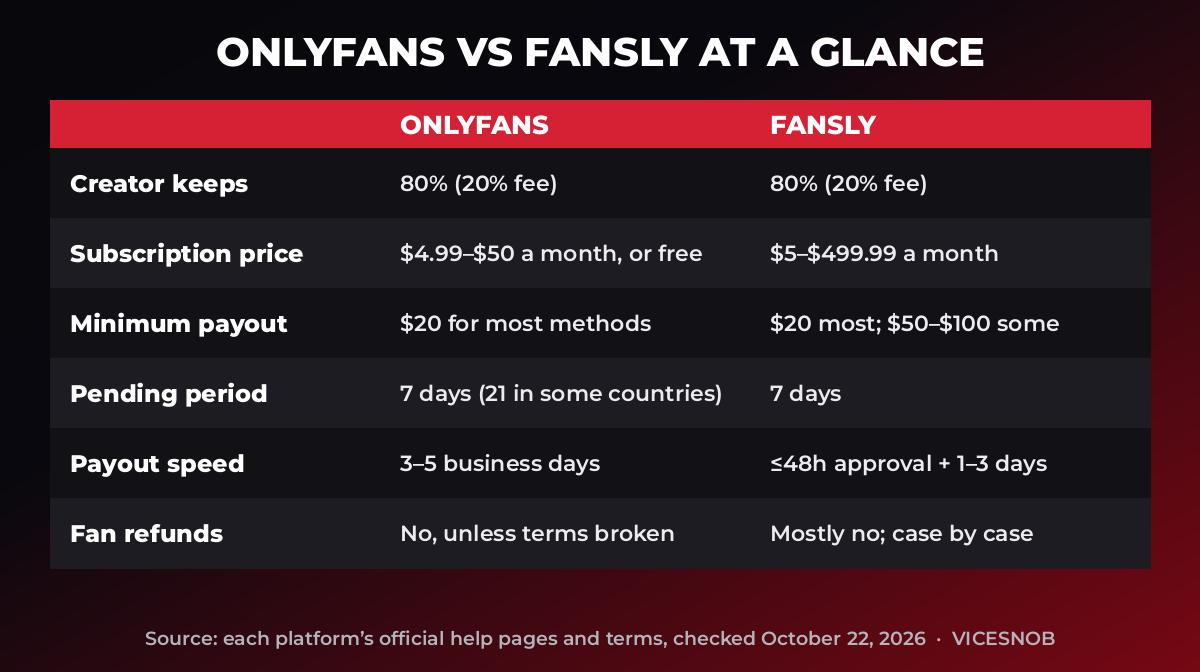
- The cut is the same. The OnlyFans help center says creators receive 80% of fan payments. Fansly’s terms say creators earn 80% too. On a $12.99 subscription, the median price in our Creator Pricing Study, a creator keeps $10.39 on either site.
- Fansly allows far higher prices. Its subscription limits run from $5 to $499.99 a month. OnlyFans allows $4.99 to $50, or a free page.
- Payout minimums are close. Both set $20 for most payout methods. Fansly raises it to $50 or $100 for some bank and crypto options.
- Both hold new earnings for 7 days. After that, OnlyFans says payouts take 3 to 5 business days. Fansly says approval takes up to 48 hours, then delivery takes 1 to 3 business days.
- Fans get little refund protection on either site. Both renew subscriptions automatically, and both call most purchases final.
How much do OnlyFans and Fansly take from creators?
OnlyFans keeps 20% of any fan payment, and that includes subscriptions, paid messages and tips. Fansly’s terms give creators 80% of subscriptions, sales and tips. So the headline fee is a draw. For more platforms, see our fees and payouts guide.
The fine print differs a little. Fansly’s terms say it may deduct revenue from chargebacks and from content that breaks its rules. The same terms deduct $5 a month from an account that has not logged in for a year.
How do OnlyFans vs Fansly subscription prices compare?
OnlyFans lets a creator set one monthly price between $4.99 and $50. A creator can also run a free page and sell individual posts or messages instead. Multi-month bundles are allowed, with a $250 maximum bundle price.
Fansly works differently. A creator can build several subscription tiers, each with its own price and perks, from $5 to $499.99 a month. Following a creator is free, and Fansly keeps that separate from subscribing.
Real prices sit near the bottom of both ranges. In our Creator Pricing Study, 69 of 103 creators charge for a subscription. Those OnlyFans prices run from $4.99 to $35, with a median of $12.99, and 34 creators are free. Adriana Chechik and Brandi Love charge $4.99, while Belle Delphine is the study’s top price at $35. One small catch: a $4.99 price works on OnlyFans, but Fansly’s minimum is $5.
How fast do creators get paid?
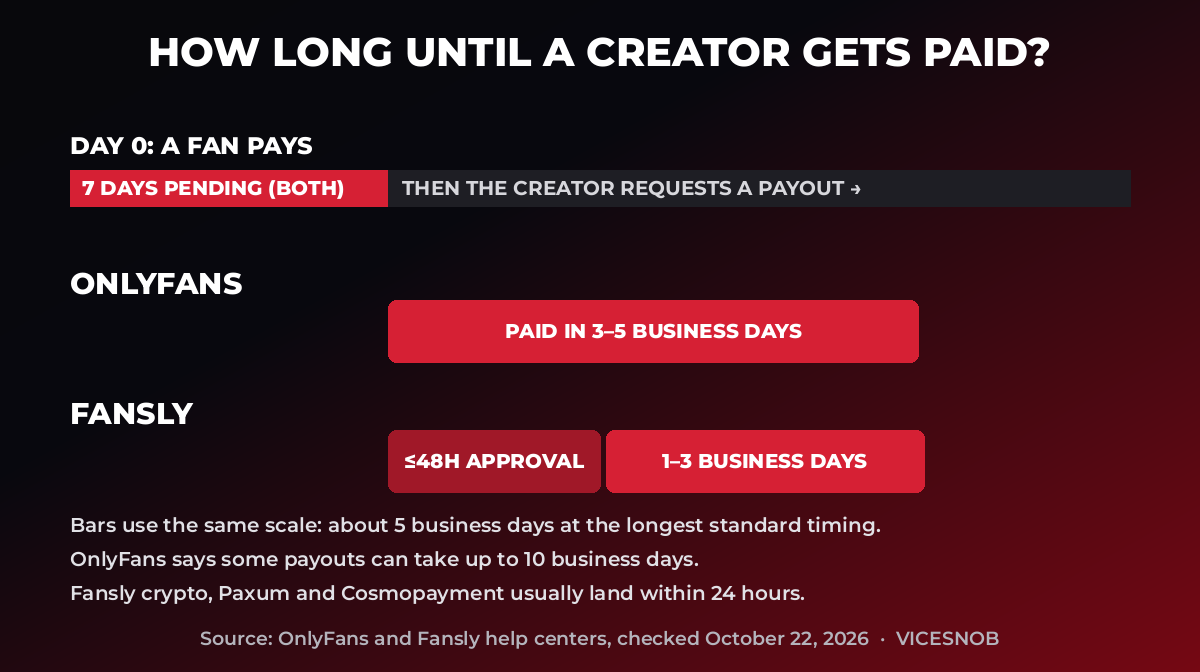
Both platforms hold new earnings for 7 days. OnlyFans says that “pending” period stretches to 21 days for creators in a few countries with many reversed payments. After the hold, OnlyFans says a payout request is paid within 3 to 5 business days, and sometimes up to 10.
Fansly says most requests are approved within 48 hours. Delivery then takes 1 to 3 business days. Crypto, Paxum and Cosmopayment usually arrive within 24 hours. Fansly also batches international bank and crypto payouts every three days. In practice, expect about two weeks from sale to bank on either site.
Minimums matter for small creators. OnlyFans sets $20 for most methods, and your Statements page shows yours. Fansly sets $20 in most countries, $50 for EU and UK bank transfers, $100 for international wires and $50 to $100 for crypto.
What should fans know before they subscribe?
Both sites renew subscriptions by default. OnlyFans says a subscription renews unless auto-renew is off, the payment fails or the price goes up. To stop it, unsubscribe from your Following page. You still pay for the full period and keep access until it ends. On Fansly, disable auto-renew on your Subscriptions page. Access runs to the end of the period.
Refunds are rare on both. OnlyFans says subscriptions, tips and paid messages are non-refundable unless its terms were broken. Fansly says subscriptions are generally final. It may consider a refund if a creator fails to deliver and blocks you, and it pays that back to your Fansly balance.
OnlyFans says your card statement shows “OnlyFans,” “OF” or “OnlyFans.com.” We did not find the equivalent for Fansly in its help pages, so check your own statement. For what a bank can see, read our guide to subscribing to OnlyFans privately. That guide includes one labeled affiliate link.
Fansly also uses a wallet you can preload, and some creators only let verified-payment users follow them. Its help center says age checks are legally required in some places, including certain U.S. states, the UK, Australia, Germany and Brazil. It does not refund fans who skip the check.
How do taxes work on each platform?
Both leave the tax bill to the creator. OnlyFans says you are responsible for any tax you owe and offers a way to request a 1099. Fansly says it does not withhold taxes and collects W-9 and W-8BEN forms. This is general information, not tax advice. U.S. creators can start with the IRS Gig economy tax center.
OnlyFans vs Fansly: which fits which creator?
ViceSnob’s Take: Pick by your pricing, not the fee. If you want one simple monthly price, OnlyFans is the easier fit. If you want a $5 tier, a $50 tier and a $250 VIP tier on one page, only Fansly allows it.
Our own database shows where creators actually are. In our October 2026 export, 401 of 469 profiles list OnlyFans as the main platform. Only three list Fansly: Bonnie Blue, Jake Blaze and Sam Brownell. That is a snapshot of our profiles, not of either platform’s total audience.
Many creators run both and treat one as a backup. Our alternatives ranking and our Subs.com vs OnlyFans comparison cover other options. OnlyFans also changed its terms this month, which we break down in our terms of service guide.
Frequently asked questions
Does Fansly take less than OnlyFans?
No. Both keep 20% of fan payments. Fansly’s terms give creators 80%, and so does OnlyFans’ help center. We checked both on October 22, 2026.
Can fans follow a creator for free on Fansly?
Yes. Fansly says following is always free and separate from subscribing. Some creators only allow followers who have added a verified payment method. OnlyFans handles this with free pages instead.
Which platform pays creators faster?
On standard bank payouts, they are about even. Both hold earnings for 7 days. Fansly’s crypto, Paxum and Cosmopayment payouts usually arrive within 24 hours after processing, which can beat a bank transfer.
Can I get a refund on OnlyFans or Fansly?
Rarely. OnlyFans says purchases are non-refundable unless its terms were broken. Fansly says subscriptions are generally final, with case-by-case exceptions when a creator fails to deliver.
What does OnlyFans show on my card statement?
OnlyFans says your statement shows “OnlyFans,” “OF” or “OnlyFans.com.” Fansly’s help pages do not say, so check your own card statement after you pay.
How we checked this
We read OnlyFans’ help pages on payout percentages, subscription prices, payouts, renewals, refunds and taxes. We also read Fansly’s terms of service (effective July 21, 2026) and its help pages on payout minimums, processing times, subscription limits, renewals, refunds and taxes. All were checked on October 22, 2026. Our counts and prices come from our profile database and our Creator Pricing Study. This article contains no affiliate links. Last verified: October 22, 2026.
So what is the bottom line on OnlyFans vs Fansly? The 20% cut is a tie. The choice comes down to price limits, tiers and payout method. Rules change often, so confirm on each site before you move. Our fees and payouts guide tracks six more platforms.


Leave a comment